Getting Started with cURL
CURL is a command line tools that allows you to send requests, download files and interact with APIs. It works any operating system like windows,mac and linux. It is similar to postman but doesn't have a GUI. Programmers use curl for the following purposes:
Testing Websites: Curl is used to check if the API is running or not. Either for a deployed website or hosted on the local computer
Debugging: curl can be used to see what exactly the server sends back as a response, giving insights to debugging efforts.
Making First request using curl
You can try using curl by opening the terminal in mac/ linux or the command prompt in windows and running this command
curl https://www.google.com The output may look very messy as it basically provides all the html,css and js for google.com website
You can also use the -I flag to only get the headers here is an example
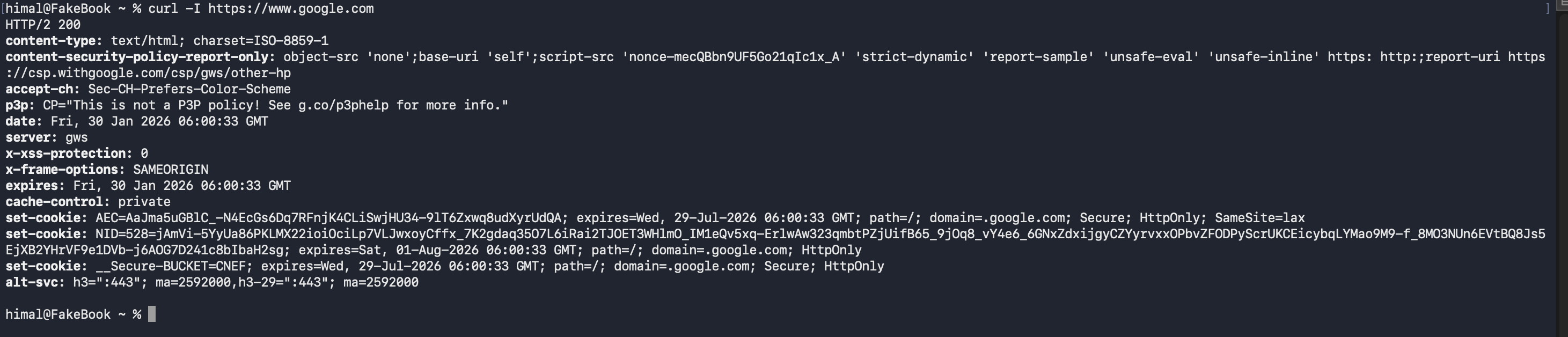
Every-time you are using cURL you are sending a request to the server and then receiving a response. The request contains the URL, http method (GET, POST, PUT, PATCH, DELETE), headers and the data you want to send. And the server sends back a response. The response includes status codes like (200, 2001, 400, 4001 ... etc) each status code has it own specific meaning. In the above example the google server sent back a http 200 status code, meaning everything is working fine.
Using crul although seems easy, some beginners often miss a minute details and scratch there heads when they don't get the response that they were hoping for. Here are some things to keep in mind when using curl.
Protocol: http / https
Method: Use correct method Get/ Post/ Put/ Patch/ Delete
Data Format: Ensure correct data format JSON/ XML
Authentication tokens / keys